Access control
Accounts are issued after NDA and partner review. Access is scoped to the approved project and document set.


QUELEN / OEM / ODM / 30
A single entry point for active partners to submit a brief, track samples and retrieve approved documents.
Partner intake · document access · sample tracking
A single entry point for active partners: brief, documents, samples and change requests.
PARTNER PORTAL
The portal is not a public catalogue. It is the working surface for partners who have passed the initial review and need a controlled place to exchange drawings, samples and approvals.
Accounts are issued after NDA and partner review. Access is scoped to the approved project and document set.
Sample requests, approval notes and the next production gate are kept against one project record.
Approved drawings, test records and packing files are retrieved from the project folder, not a public download page.
Access is deliberately narrow. The portal is a project workspace, not a public catalogue.
| Portal area | Contents | Access | Next step |
|---|---|---|---|
| Project brief | Room matrix, target market, volume | Partner account | Submit for review |
| Documents | Approved drawings and test records | Project-scoped | Download released files |
| Samples | Sample status and approval notes | Partner account | Confirm fit and function |
| Changes | Change request and impact note | Approved project | Re-quote if needed |
Panel makers, integrators, brands and importers with a defined project or repeated demand. Access follows NDA and a technical fit review.
No. The account receives the documents released for its approved project, not the entire private library.
It provides a controlled record. Commercial negotiation and formal approvals can still run by email, but the project file remains the reference.
Named users are added to the project. Access is not forwarded to unregistered third parties.
Raise a change request against the project record. The impact on sample, price and lead time is reviewed before the next batch.
Tell us the project type, volume and the documents you need. We reply within 1–3 business days with the NDA step and the review questions.
Send the room schedule, target market and the released QL code or validation model you are planning with. The team replies with the model questions, document set and sample plan.
QUELEN / LEGAL
Last updated: 24 November 2026
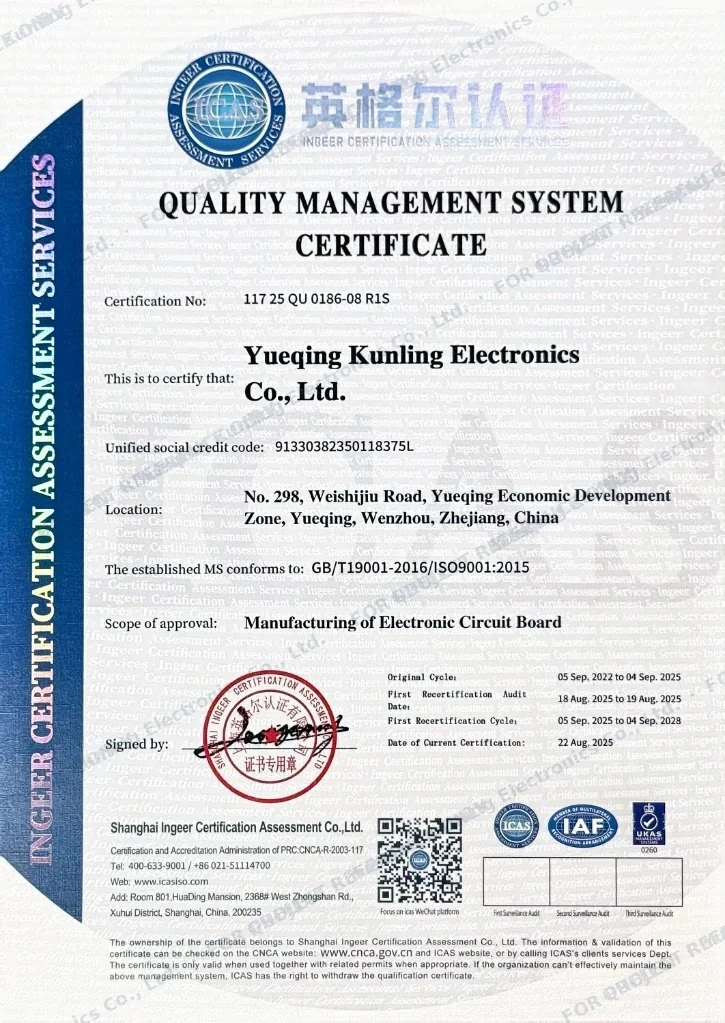
ISO 9001:2015 · Certificate 117 25 QU 0186-08 R1S · Scope: manufacturing of electronic circuit board · Valid 2025-09-05 → 2028-09-04. Issued by Shanghai Inger Certification Assessment Co., Ltd.